Support and capture users’ intent with semantic search and RAG

Benefits

Accelerate self-service and user adoption

Help visitors find exact solutions immediately instead keyword searches or manual browsing, while pointing to the actual sources of information on your portal.

Integrate AI safely

Screen incoming queries instantly to block policy violations, stop unauthorized retrieval, and gate access via role-based permissions (RBAC).

Gain a close and actionable user insight

Log user questions and queries to point out documentation gaps, evaluate response accuracy, and resolve common friction points before users reach out to support.

Challenges in search and information sourcing in the AI age


People have a tendency to prefer colloquial, natural sentences for search instead of keywords, and using LLMs instead of regular search engines. Developer portals still need excellent information architecture and content to serve users who browse and explore content manually, but also need to be optimized for external AI search and indexable for semantic search or RAG (Retrieval-Augmented Generation).

While external AI visibility is great for business growth and discoverability, adding semantic search to your portal is necessary to serve this new user behaviour with content directly from the source of your portal, without distortion.

Semantic search & RAG: guide users to the source-of-truth through a conversation 


In our solution, serving the new user needs in search is possible using Drupal AI in our RAG-based vector search and AI assistant.

  • You control what site content gets indexed, and only your content is sourced, without the noise of content from the internet. The semantic search paired with a conversational interface instead of a search bar allows people to engage with portal content in their natural language.

  • Since the query itself is processed and analysed, you can stop the search from fetching any results using moderation and security guidelines.

  • You can log the questions and responses to analyse occasional hallucinations or errors, but more importantly, to gain a better and closer understanding of how your users interact with your services, and what questions remain unanswered that lead them to open tickets or contact support.

  • The interface allows restricting access to the feature using role-based access control or a login gate, providing full privacy for data governance.

Implementing a feature like this comes with challenges such as:
  • how to avoid hallucinations,
  • which models and vector database providers are great to integrate with, and
  • how to set up evaluations for testing a feature, which relies on probabilistic technology, making it more reliable.
These challenges are evaluated and tackled in a flexible way, with multiple supported providers and vendors, configuration, and expertise.


How RAG search works

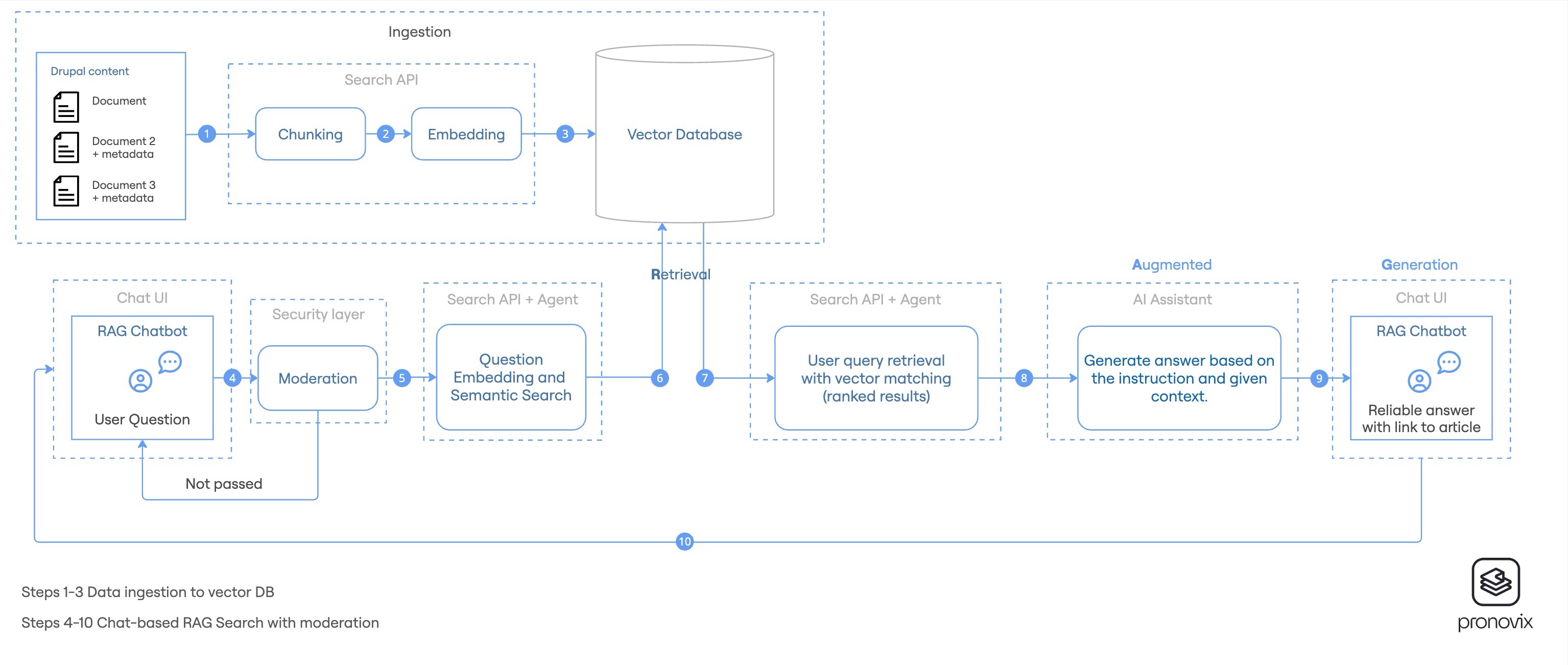
1. Preparing content: ingestion and indexing


  1. Semantic chunking: The content is ingested and partitioned into smaller, semantically coherent text chunks to optimize retrieval granularity and match precision.
  2. Vector embedding: Each chunk is passed through an embedding model to generate high-dimensional vector representations capturing the semantic meaning of the content.
  3. Storage and indexing: Embeddings are stored and indexed in a vector database for low-latency similarity search.

2. Retrieval-Augmented Generation (RAG) pipeline

  1. Query ingestion and moderation: The user's question is captured via the conversational interface. It is observed and passed through a security moderation layer to filter prompt injections or policy and guardrail violations.
  2. Vector retrieval: The validated query is converted into an embedding and matched against the vector database using cosine or dot-product similarity to retrieve the top relevant chunks.
  3. Context augmentation: The retrieved chunks are injected alongside the user query into a structured system prompt, establishing strict boundaries for the model's response.
  4. Generation and citation: The LLM synthesizes an answer restricted solely to the provided context, and returns the response with direct citation links to the source Drupal nodes.

RAG search diagram

Are you interested in implementing semantic search with RAG in your portal?
 

Contact us

Pronovix Field Notes

Observations from the Pronovix team on developer portals, technical documentation, architecture, UX, APIs, and the surrounding questions: AI-native workflows, business capabilities, buyable solutions, and operational reality.


Subscribe